Files and explorer
The Project explorer lists project files. Select a file to open it; unopened account files load when needed. Expanding/collapsing a directory only changes the explorer view.
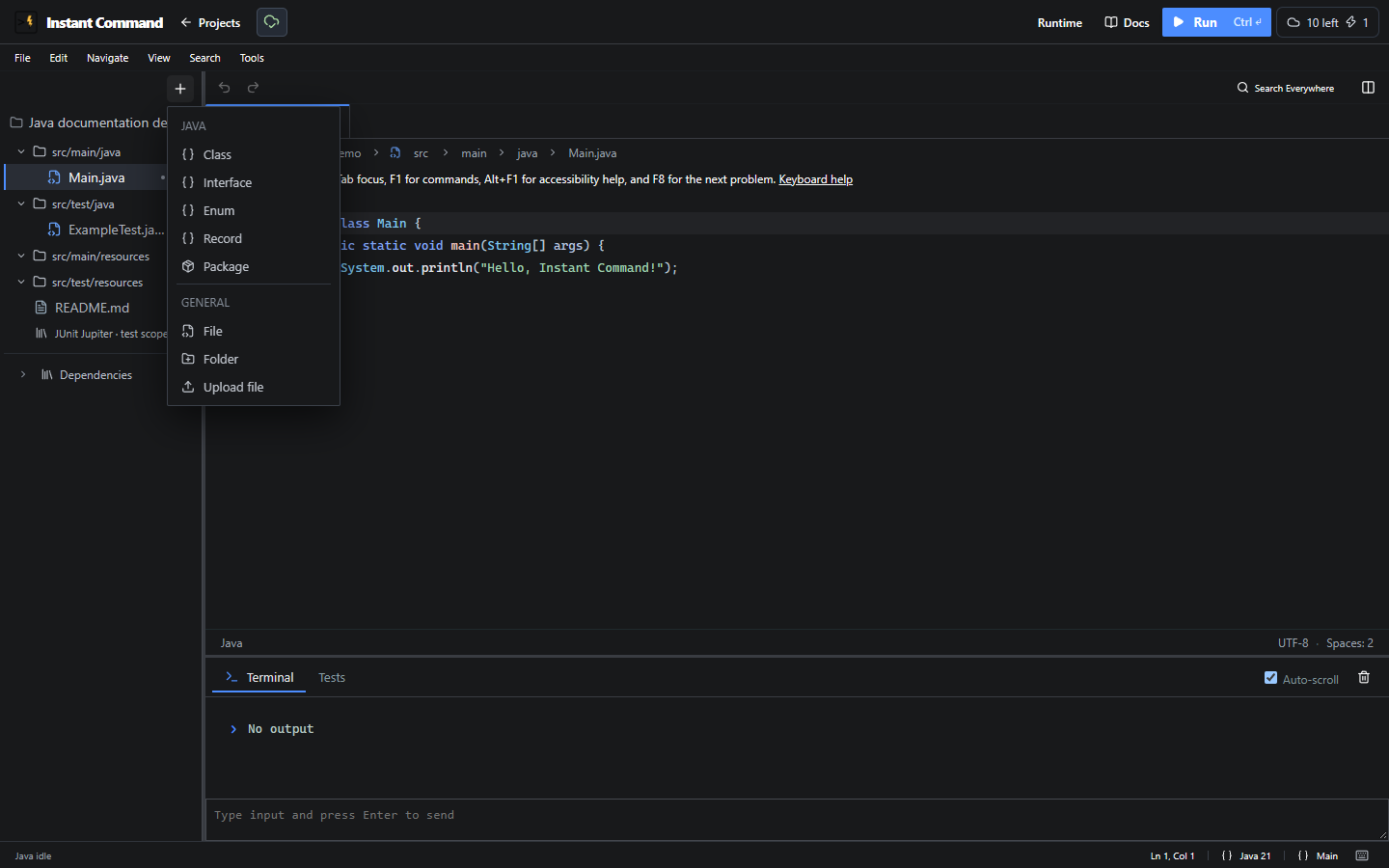
Add controls
Section titled “Add controls”| Control | Availability | Action and result |
|---|---|---|
| Add to Java project | Editable Java project | Opens source creation and general file actions. |
| Add to a source folder / package | Editable Java source set | Creates in that source root/package. Test roots stay separate from production. |
| Class | Java add menu | Creates a class. |
| Interface | Java add menu | Creates an interface. |
| Enum | Java add menu | Creates an enum. |
| Record | Supported Java version | Creates a record declaration. |
| Annotation | Java add menu | Creates an annotation declaration. |
| Package / Subpackage | Java source root / package | Creates a namespace beneath the configured root. |
| File | Editable project | Opens Create a file. Enter Filename, then Create file. Invalid or duplicate names are rejected. |
| Folder | Editable project | Opens Create a folder. Enter Folder path, then Create folder. This does not declare a Java package. |
| Upload file | Editable project | Imports into the selected directory. Accepted extensions depend on project type; failures appear in the explorer. |
| Add resource to a resource folder | Java resource root | Adds a supported text resource. |
| Add Java dependency | Saved editable Java project | Uploads/attaches a dependency archive, separately from source uploads. |
| Expand / Collapse dependencies | Java | Shows/hides attached dependency rows. |
Java text uploads include .java, .md, .txt, .properties, .json, .xml, .csv, .html, .yaml and .yml. Arduino/ESP-IDF have different validators. The chooser’s extension list does not guarantee that every destination path is valid.
File and folder actions
Section titled “File and folder actions”Use Actions for [path] or the context menu. Read-only workspaces hide editing actions.
| Control | Action and conditions |
|---|---|
| Open to side | Opens the file in another editor group. |
| Rename / move… | Changes its project-relative path after validation. Review Java packages/references after moving sources. |
| Refactor references | Opens the microcontroller reference refactoring flow separately from renaming. |
| Download file | Downloads this file; independent of paid whole-project export. |
| Delete file | Removes a file through the deletion flow. Disabled for the Arduino entry sketch or last remaining file. |
| Delete folder | Deletes the directory and nested files after confirmation. Source roots/protected files cannot be deleted. |
| Close editor tab | Keeps edits and closes the view; does not delete the file. |
| Create Test… | Creates a package-mirrored Java test skeleton or opens the existing test. |
| Run Tests in File | Runs tests for that Java file when testing is available. |
| Go to Test / Tested Class | Navigates using package/filename conventions; offers a chooser for multiple matches. |
There is no general Duplicate file entry here. Create a separate supported file and copy contents if needed.
Arduino libraries and data
Section titled “Arduino libraries and data”New Arduino library creates editable source and library.properties. Upload Arduino library ZIP validates/expands a standard archive under libraries/. Import Arduino library from Git URL previews the library and dependencies before a revision-checked install. Inspect source/version/examples before updating. Remove library [name] removes project-local libraries; built-in libraries have no removal action.
A Board mismatch warning reports declared architecture compatibility; compilation still determines whether it builds. Libraries remain when changing boards. ESP32 Arduino data/ assets support LittleFS/SPIFFS physical filesystem images. UNO retains these files but labels them unused. Binary data assets can be downloaded; they are not source text.
Related: Java layout, Save and recover, Hardware workbench.