Automated grading
Automated tests react to simulator events instead of continuously polling the program. This makes timing explicit and lets every check in a group observe the same simulator moment.
Java assignments use a separate competition-style test builder. Each case starts a clean program run with its own standard input and expected output. Bulk add cases accepts many named, multiline input/output cases in one paste, and competition matching ignores outside whitespace and line-ending differences by default. Arguments, environment values, and test files remain available under each case’s advanced options.
Java assignment networking also has its own Virtual network tab. Teachers create reusable named response scenarios there, with multiple fake hostnames or IPv4 addresses and ports. Routes can return text, validated JSON, or an uploaded file. A test shows only the scenario it uses, keeping server setup separate while still allowing different tests to receive different responses.
Event groups
Section titled “Event groups”Every group follows the same structure:
WHEN an event occursCHECK one or more expectationsAWARD the group's points when the checks passAn event might be simulation start, a simulation time, a GPIO edge, a GPIO state change, or matching serial output. A group can run for the first occurrence or for every occurrence.
Test starter-project components
Section titled “Test starter-project components”Build the assignment circuit in Starter Project before creating component checks. The visual test builder lists compatible components from that circuit and keeps each check linked to the selected component’s stable project ID.
Common output checks include:
- LED, relay, buzzer, and motor output is on or off.
- LED, relay, buzzer, motor, and individual RGB channels change a specified number of times.
- A character LCD line contains or exactly equals text such as
apple. - A zero-based LCD character position has a specific value, such as character
0on line 1 beinge.
The component must remain in the student’s project and its tested output must remain connected. Renaming or moving it on the canvas does not break the test. Raw GPIO and Serial checks remain available when the pin or protocol itself is the learning objective.
Deterministic execution
Section titled “Deterministic execution”Tests run with a fixed seed and virtual-time limit. Saved definitions are executed on the server against normalized simulator events. Browser state is not accepted as a grade.
Students also see a Visible tests panel inside the assignment IDE. It can run one public event group or all public groups, stops on request, uses emulator cycle time, and reuses the current firmware build while the project revision is unchanged. Hidden and instructor tests are never sent to this runner. A local pass is feedback only; submission always creates a separate authoritative server run.
Submission grading uses the saved project and test versions so a later edit cannot change an earlier attempt. Teachers can inspect test results and the calculated score. If a test cannot complete because of a service problem, review that result before assigning a student score.
Teachers see queued, compiling, test-running, scoring, complete, and needs-review stages. Use Regrade when the saved attempt needs another grading run.
Designing useful checks
Section titled “Designing useful checks”- Use one event group for checks that must observe the same moment.
- Prefer a meaningful hardware or serial event over a broad timeout.
- Add an event timing check when early or late behavior matters.
- Use Every occurrence for repeated behavior such as blink timing.
- Keep student-facing groups public and reserve hidden groups for edge cases or final validation.
For legacy assignments, saved test weights still use the older scaling model. New rubric assignments allocate points through rubric items, as described below.
Rubric-linked scoring and disclosure
Section titled “Rubric-linked scoring and disclosure”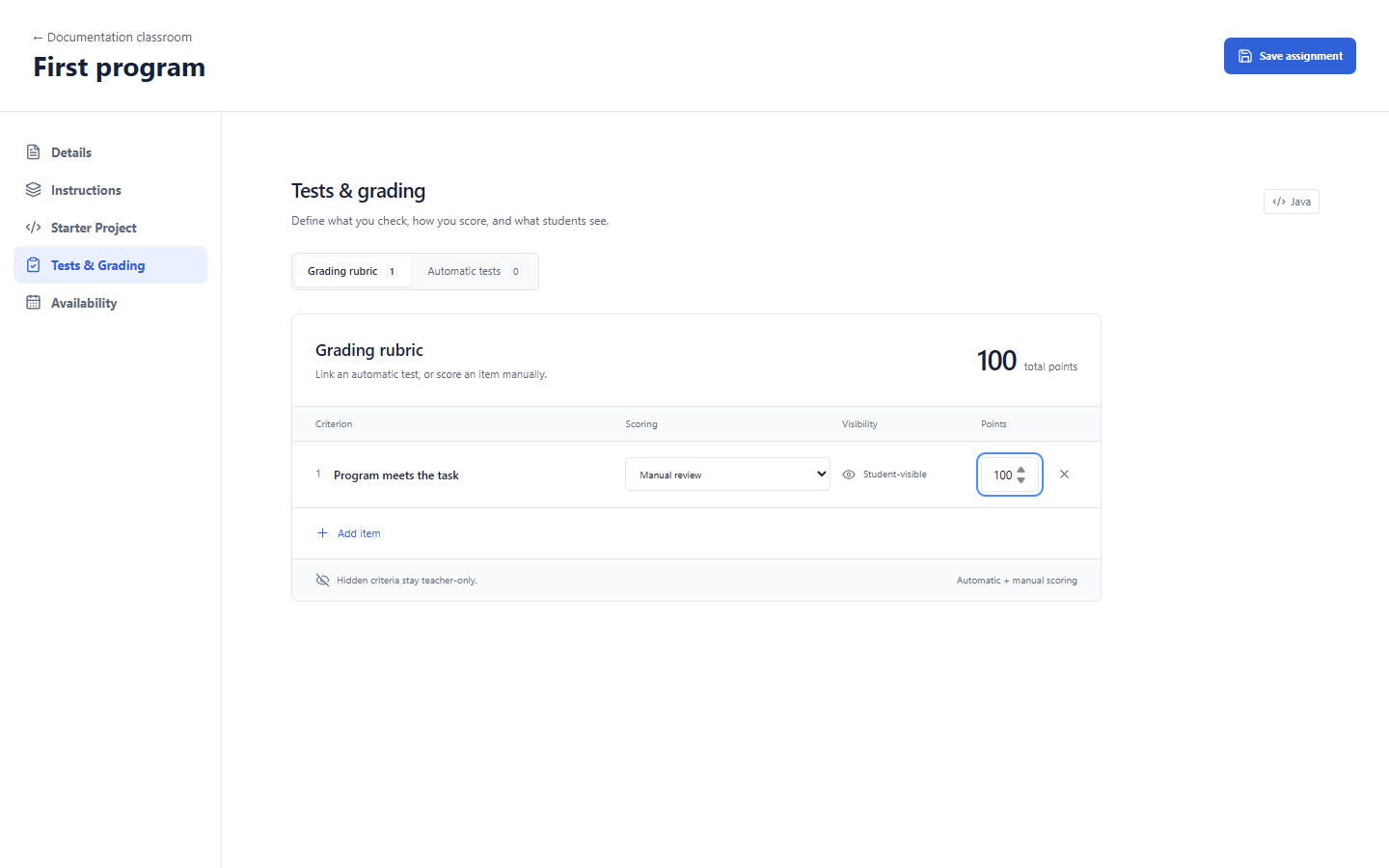
| Control | Action / condition |
|---|---|
| Grading rubric | Opens rubric allocation and criterion editing. |
| Automatic tests | Opens assignment-local tests; saving tests is separate from saving the assignment. |
| Assignment total points | Sets the assignment maximum; allocations must match before opening. |
| Add item | Adds a criterion; disabled at the item limit. Enter its name and points. |
| Rubric item name / points | Edits the criterion and allocation. |
| Rubric item automated test | Selects Manual review or a saved, eligible test. A test already linked elsewhere cannot be linked twice. |
| Rubric item visibility | Toggles Student-visible / Hidden. Hidden criteria and linked details stay teacher-only. |
| Remove rubric item | Removes that draft criterion; save the assignment to persist. |
| Save assignment | Persists the rubric/assignment draft after validation. |
See class and builder controls for navigation and the other builder sections.
New assignments use rubric-based grading. The rubric owns point allocations and optional links to saved tests; its allocations must match the assignment maximum before opening/submission. Link one whole Java case or MCU event to one item; each test can link only once. Save tests before linking them, then save the assignment separately.
A passing linked test earns all item points; failure earns zero. Missing, disabled or errored results require review. Unlinked tests provide feedback but contribute zero rubric points. Manual items remain pending until the teacher records a score, including an explicit zero. In grading, use the calculated total or a reasoned override, then publish separately.
Test visibility and rubric-item visibility both affect student feedback. A hidden rubric link can suppress a result even when other test settings look public. Hidden/instructor results must not expose names, expected values, fixtures or failure detail. After-due/after-publish feedback waits for its configured condition. Always inspect the student view; do not use a teacher screenshot as evidence of student disclosure.
Project JUnit is separate: students can run their own tests, but authoritative grading uses production sources/resources and excludes project test sources. See JUnit.
The reusable Content library and advanced .etest scripting are hidden. Author assignment-local software cases or visual event groups through Tests & Grading. Teacher-visible results and status are not automatically a published final grade.